ElvUI Docs

Search Docs

Retail · Français

Enter a search term.

Try a setting name or a few words from your question.
↑ ↓ Navigate ↵ Open esc Close

Enter a search term.

Appearance

Choose a display mode, then a holiday look or an accent color.

Theme
Accent color

Choosing a color uses the standard site appearance.

ElvUI blue by default. Class colors are adjusted for readable text and controls.

Migration outline for SharedMedia customization.

Use a media addon

The upstream guide uses SharedMedia and SharedMedia_MyMedia to register fonts, textures and sounds.
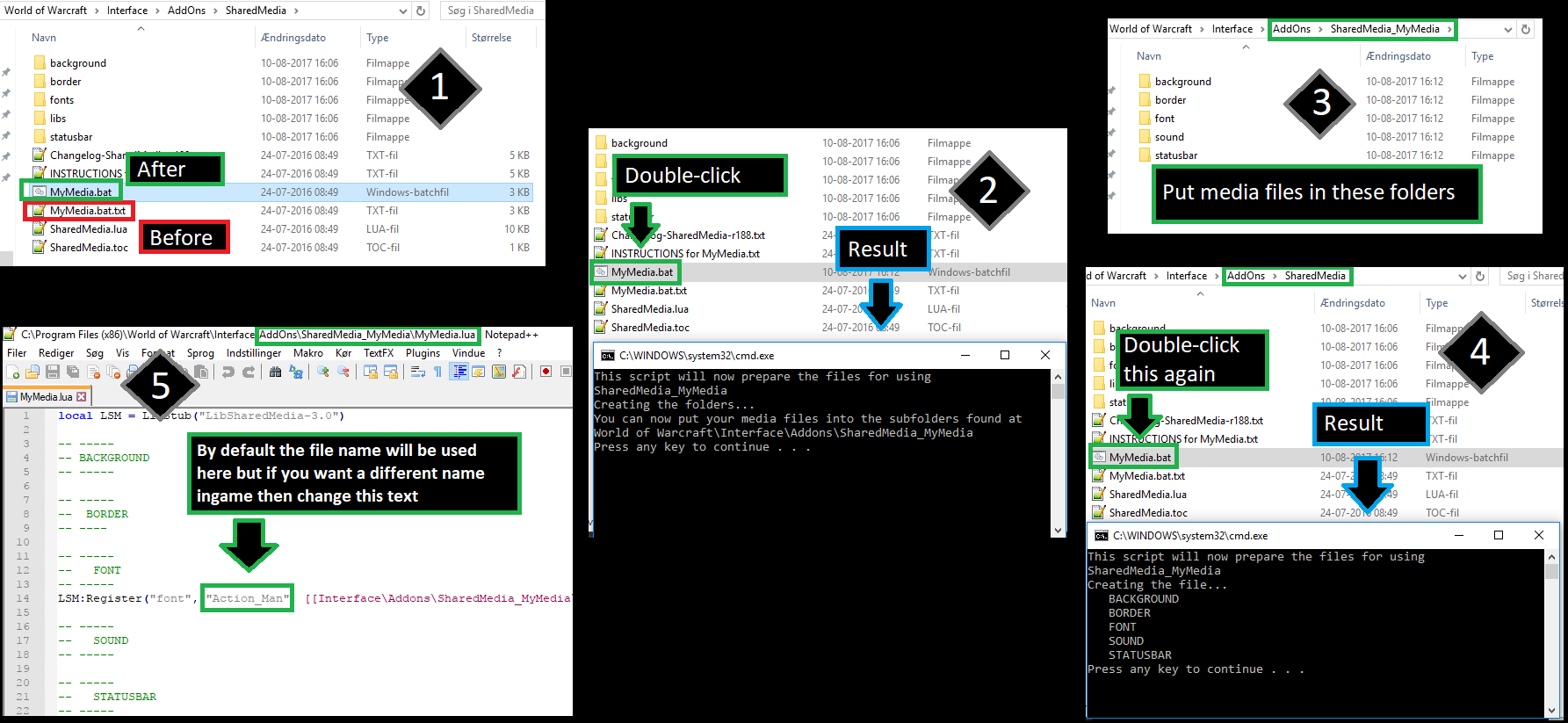
Five-panel SharedMedia example showing MyMedia script rename, generated folders, media placement, rerun, and display-name editing.
Source: https://github.com/tukui-org/ElvUI/wiki/custom-media. Historical upstream screenshot; verify against the current addon before publishing.

Migration outline

Document supported formats, installation, adding and registering files, and choosing media in ElvUI. Include Windows automatic and manual workflows with current screenshots. Verify TOC interface metadata per game version rather than copying a fixed value.

Source: SharedMedia Guide

All Guides